
Integrate Facebook form leads
After launching form ads on Facebook, you can use SaleSmartly to automatically receive user-submitted leads, create customer profiles, and save detailed form information in customer notes, allowing the customer information obtained from ads to enter the team's daily follow-up process.
Even if a user fills out the form but doesn't send any further messages, SaleSmartly can still receive the submitted information, making it convenient for the team to view and follow up centrally.
- What are Facebook form leads?
Meta offers lead generation methods such as forms, messages, and calls. This article introduces the method of collecting customer information through instant forms . You can first refer to Meta Form Leads Ads to learn about related ad placement, or directly view the official customer acquisition guide document.
You can understand the entire process through the following concepts:
| concept | meaning |
|---|---|
| Form Ads | This article refers to potential customer advertisements that guide users to fill out instant forms, used to attract people interested in products or services to submit information. |
| Instant Form | Facebook's data collection forms are used to gather contact information and needs. Users can fill in or confirm their contact information and answer questions you set (some information can be pre-filled by Meta, reducing the amount of typing required). |
| Potential customers and leads | Potential customers are people who show interest in the business and are ready to communicate further. In this article, the information records generated after a user submits a form are referred to as "leads". |
| SaleSmartly Customer Profile | SaleSmartly is used to uniformly store and manage customer information records, including basic customer information, contact details, notes, etc., making it easier for the team to understand customers, manage customer relationships, and follow up continuously. |
The entire process can be understood as follows: User sees ad → Fills out and submits instant form → Lead generated → SaleSmartly automatically creates customer → Customer notes are added to form details → Team follow-up.
II. In which scenarios is this feature suitable?
If your business requires collecting customer contact information and needs before team confirmation, you can use the form-based lead generation feature. For example:
| Scene | Information that can be collected in a form | How to use after integrating with SaleSmartly |
|---|---|---|
| Product Inquiry and Quotation | Products of interest, purchase quantity, and contact information | Review customer needs, prepare quotations, and arrange follow-up communication. |
| Schedule a trial or demonstration | Desired services, preferred time, and contact information | We will contact the customer to confirm the information provided and arrange a trial or demonstration. |
| Event Registration | Registrant information, activities or themes of interest | We centrally organize registered customers and follow up on their participation intentions and related needs. |
If you don't want to receive messy and meaningless leads, Meta forms can also require potential customers to verify their phone numbers using a one-time verification code.
III. How to use it in SaleSmartly?
Step 1: Prepare your advertising account and public page
Please prepare the form ads for your campaign in Meta and confirm that you can authorize the following two resources:
- Facebook Page : The page to which this instant form belongs.
- Advertising account : The account used to run the form ads.
When authorizing, please verify that the advertising account and public page correspond to the business you need to receive leads for.
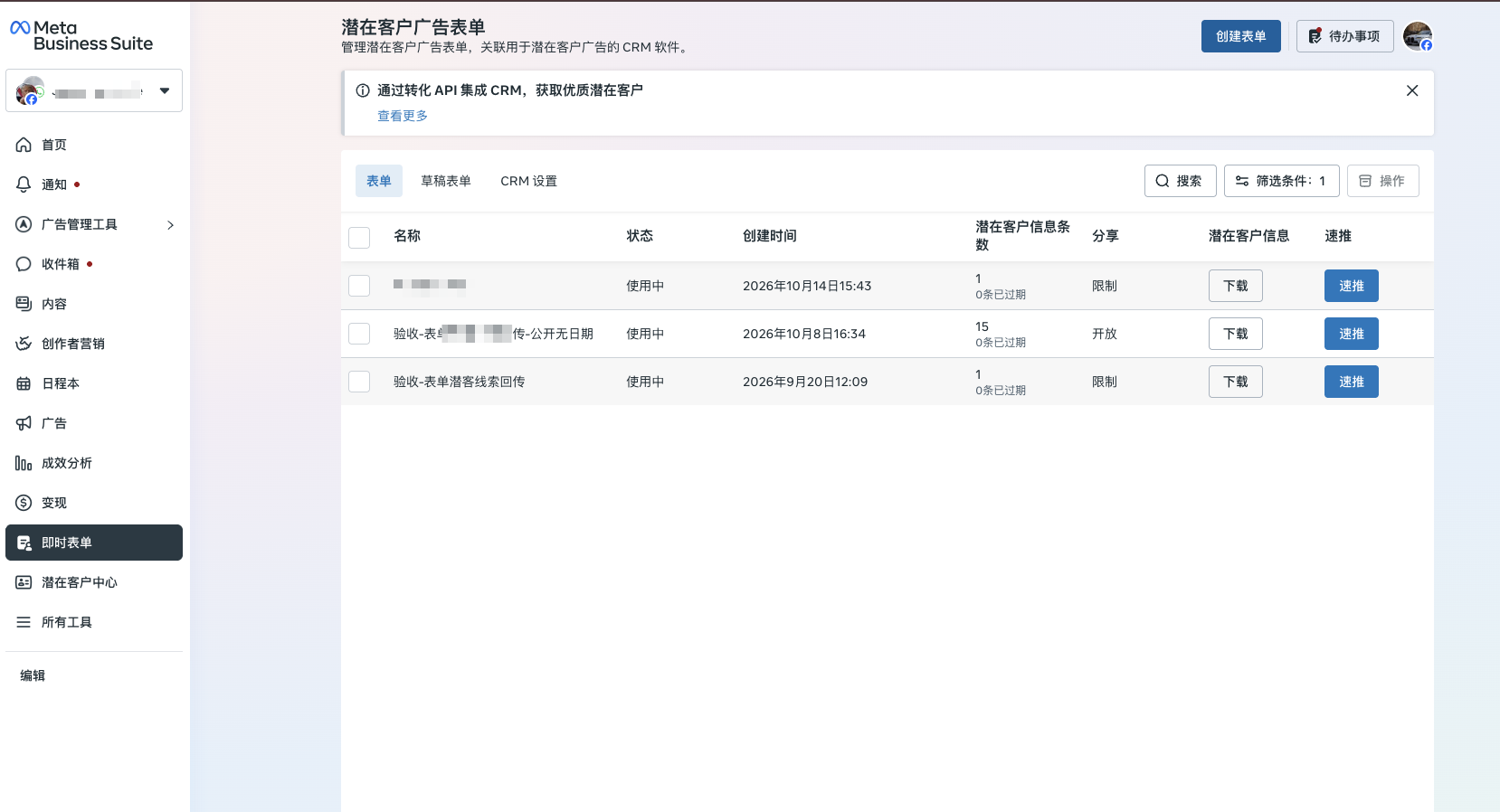
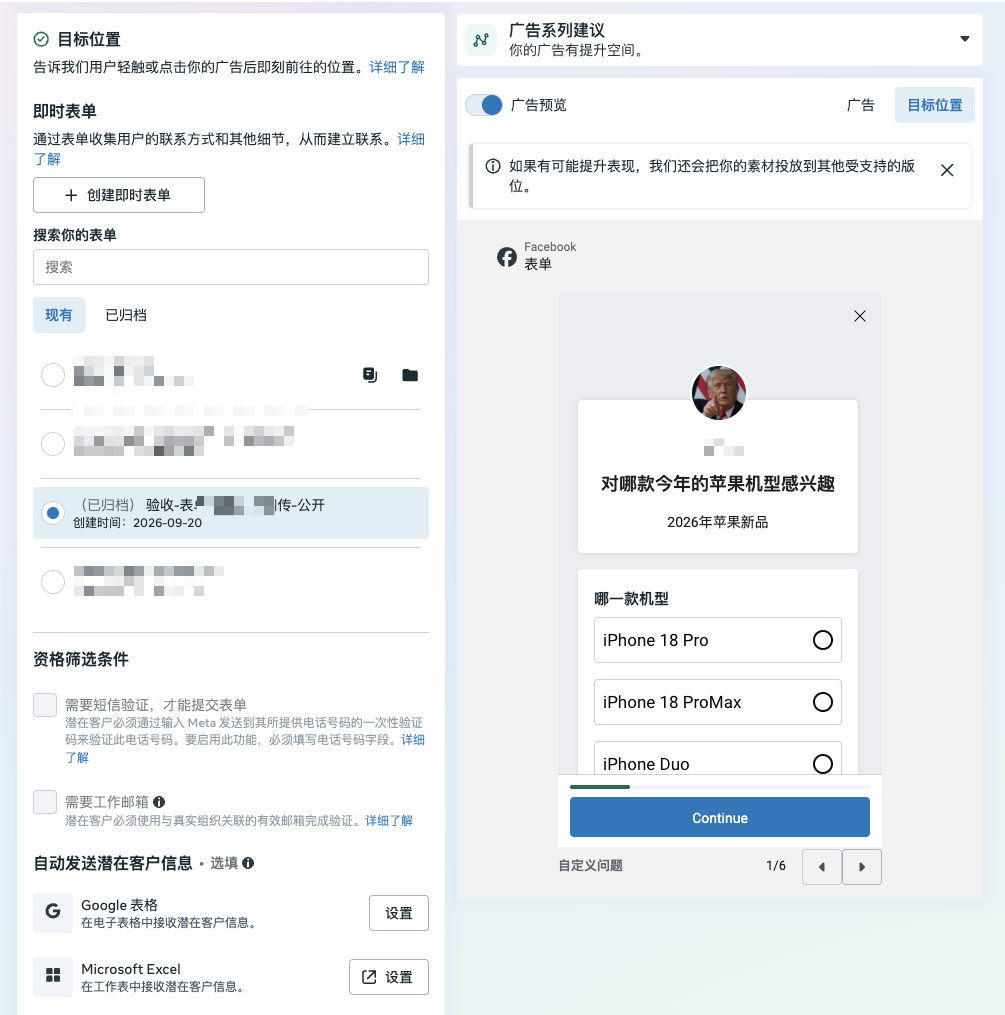
Step 2: Complete the authorization in SaleSmartly
- Log in to SaleSmartly and go to "Applications → Advertising Platform → Meta Business Account → Authorize Account" .
- Click "Authorize" .
- Log in to Facebook as prompted on the page and authorize the advertising account for the form ad and the public page to which the form belongs.
- Return to SaleSmartly after authorization is complete.
If you have previously authorized an advertising account, you will need to re-authorize it to obtain the form-related permissions.
Step 3: Automatically receive leads and create customers
Once authorization is complete, leads generated from subsequent form submissions by the user will automatically enter SaleSmartly. The system will create a customer profile based on the contact information in the form and write detailed form information into the customer's notes.
You don't need to copy customer information one by one, nor do you need to export a table and then manually enter it.
Step 4: Review the form information and follow up.
Open the corresponding customer profile, view the customer information and the form questions and answers in the notes, understand the other party's specific needs, and then arrange subsequent communication.
For example, a user fills in "want to learn about multi-channel customer service management" and "team has 10 people" on the product demonstration appointment form. After the lead enters SaleSmartly, the follow-up staff can learn this information from the customer's notes, prepare the demonstration content in advance, and reduce repeated inquiries.
IV. What are the benefits of connecting?
- Reduce manual data entry : Leads are automatically entered into SaleSmartly and customers are created, saving time on downloading, organizing, and entering lists, and reducing errors from manual data entry.
- Reduce missed form-filling customers : After a user submits a form, even if they do not initiate a chat, their information can still be entered into SaleSmartly, making it easier for the team to process it later.
- Understanding needs before communication : Detailed form information is saved in the customer's notes, allowing the follow-up staff to understand the customer's concerns in advance, making communication more targeted.
- Centralize customer data management for the team : Incorporate leads generated by advertising into daily customer management processes, making it easier for authorized members to view data, verify needs, and coordinate follow-up work.
;}.cls-2{fill:%230868f7;}.cls-3{fill:url(%23未命名的渐变_44);}.cls-4{fill:%23333;}%3c/style%3e%3clinearGradient%20id='未命名的渐变_8'%20x1='33.73'%20y1='100.61'%20x2='-0.03'%20y2='-1.06'%20gradientUnits='userSpaceOnUse'%3e%3cstop%20offset='0'%20stop-color='%237ae9fb'/%3e%3cstop%20offset='0.67'%20stop-color='%232b90f8'/%3e%3cstop%20offset='1'%20stop-color='%230868f7'/%3e%3c/linearGradient%3e%3clinearGradient%20id='未命名的渐变_44'%20x1='27.86'%20y1='18.67'%20x2='68.36'%20y2='22.22'%20gradientUnits='userSpaceOnUse'%3e%3cstop%20offset='0'%20stop-color='%235ac7f2'/%3e%3cstop%20offset='1'%20stop-color='%230868f7'/%3e%3c/linearGradient%3e%3c/defs%3e%3cpath%20class='cls-1'%20d='M29,28.74V81.91l-9.51-3.68v0L8.52,74A7.17,7.17,0,0,1,4,67.32V24.54A3.76,3.76,0,0,1,9.08,21Z'/%3e%3cpath%20class='cls-2'%20d='M68.09,78.07a13.15,13.15,0,0,1-17.9,12.06L29,81.91h0V28.74L50.19,37A13.17,13.17,0,0,0,68.08,25.3h0Z'/%3e%3cpath%20class='cls-3'%20d='M68.08,25.3a13.19,13.19,0,0,1-6.73,10.87A13.09,13.09,0,0,1,50.19,37L29,28.74V6A3.76,3.76,0,0,1,34.1,2.52l25.59,9.91A13.22,13.22,0,0,1,68.08,25.3Z'/%3e%3cpath%20class='cls-4'%20d='M129.06,81.76a4.33,4.33,0,0,1-3.19-1.31,4.4,4.4,0,0,1-1.31-3.24V56.86H97.65V77.21a4.36,4.36,0,0,1-1.35,3.2A4.68,4.68,0,0,1,93,81.76a4.32,4.32,0,0,1-3.19-1.31,4.37,4.37,0,0,1-1.32-3.24V27.27A4.58,4.58,0,0,1,89.83,24a4.59,4.59,0,0,1,7.82,3.27V48.15h26.91V27.27A4.58,4.58,0,0,1,125.91,24a4.59,4.59,0,0,1,7.82,3.27V77.21a4.37,4.37,0,0,1-1.36,3.2A4.65,4.65,0,0,1,129.06,81.76Z'/%3e%3cpath%20class='cls-4'%20d='M163.77,81.66c-6.57,0-11.76-1.92-15.44-5.7s-5.54-9.07-5.54-15.74a26.76,26.76,0,0,1,2.09-10.43,17.72,17.72,0,0,1,6.67-8.06,19.15,19.15,0,0,1,10.68-2.95,19,19,0,0,1,10.46,2.8,18.7,18.7,0,0,1,6.55,7.36,22.53,22.53,0,0,1,2.36,10.28A4.51,4.51,0,0,1,177,63.77H152.23a10.8,10.8,0,0,0,3.49,6.65c2,1.68,4.88,2.52,8.66,2.52a22.25,22.25,0,0,0,7.54-1.21c.74-.3,1.55-.67,2.37-1.07a3.75,3.75,0,0,1,1.84-.4,4.09,4.09,0,0,1,3,1.15,4,4,0,0,1,1.12,3,4.38,4.38,0,0,1-2.58,3.82,32.34,32.34,0,0,1-6.36,2.61A28.67,28.67,0,0,1,163.77,81.66ZM172.4,55.9a9.72,9.72,0,0,0-1.63-4.56A9.9,9.9,0,0,0,167,48a10.38,10.38,0,0,0-4.64-1.14,12,12,0,0,0-4.77,1.06,9.54,9.54,0,0,0-4.89,5.66,11.78,11.78,0,0,0-.51,2.3Z'/%3e%3cpath%20class='cls-4'%20d='M193,81.64a4.49,4.49,0,0,1-4.51-4.55V27.28A4.58,4.58,0,0,1,189.84,24a4.48,4.48,0,0,1,3.28-1.36A4.36,4.36,0,0,1,196.35,24a4.46,4.46,0,0,1,1.31,3.31V77.09a4.34,4.34,0,0,1-1.35,3.2A4.67,4.67,0,0,1,193,81.64Z'/%3e%3cpath%20class='cls-4'%20d='M263.79,81.71a5.7,5.7,0,0,1-4.2-1.74,5.76,5.76,0,0,1-1.73-4.19V27.37a4.58,4.58,0,0,1,1.35-3.27A4.59,4.59,0,0,1,267,27.37V72.53h24a4.58,4.58,0,0,1,3.27,7.82A4.66,4.66,0,0,1,291,81.71Z'/%3e%3cpath%20class='cls-4'%20d='M424.48,81.74a4.71,4.71,0,0,1-2.71-.88,5.43,5.43,0,0,1-1-1l-.07-.09-12.41-17-5.41,5v9.44a4.31,4.31,0,0,1-1.36,3.19,4.66,4.66,0,0,1-3.3,1.36A4.29,4.29,0,0,1,395,80.42a4.36,4.36,0,0,1-1.32-3.23V27.37A4.58,4.58,0,0,1,395,24.1a4.52,4.52,0,0,1,6.58.12,4.54,4.54,0,0,1,1.24,3.15V56.31l17.72-16.38.05,0a4.8,4.8,0,0,1,2.94-1.11,4.4,4.4,0,0,1,3.27,1.2,4.57,4.57,0,0,1,1.2,3.27,4.44,4.44,0,0,1-.77,2.33,7.45,7.45,0,0,1-1.43,1.65l-11,9.64,13.34,17.68a5,5,0,0,1,1,2.71,4.12,4.12,0,0,1-1.36,3.24A4.64,4.64,0,0,1,424.48,81.74Z'/%3e%3cpath%20class='cls-4'%20d='M317.93,81.76a21.5,21.5,0,1,1,21.17-21.5A21.37,21.37,0,0,1,317.93,81.76Zm0-34.1a12.61,12.61,0,1,0,12.42,12.6A12.52,12.52,0,0,0,317.93,47.66Z'/%3e%3cpath%20class='cls-4'%20d='M212.18,101.22a4.12,4.12,0,0,1-3.05-1.26,4.17,4.17,0,0,1-1.26-3.1V43.34a4.37,4.37,0,0,1,1.3-3.14,4.26,4.26,0,0,1,3.13-1.3,4.19,4.19,0,0,1,3.1,1.26,4.32,4.32,0,0,1,1.26,3.16,20.77,20.77,0,0,1,13-4.54,21.51,21.51,0,0,1,0,43,20.51,20.51,0,0,1-13-4.57V96.86a4.15,4.15,0,0,1-1.3,3.06A4.5,4.5,0,0,1,212.18,101.22Zm17.43-53.63c-6.23,0-12.93,4.11-12.93,12.72a12.73,12.73,0,0,0,25.46,0A12.71,12.71,0,0,0,229.61,47.59Z'/%3e%3cpath%20class='cls-4'%20d='M365.76,81.76a21.5,21.5,0,1,1,21.18-21.5A21.37,21.37,0,0,1,365.76,81.76Zm0-34.1a12.61,12.61,0,1,0,12.42,12.6A12.52,12.52,0,0,0,365.76,47.66Z'/%3e%3c/svg%3e)